Screenshot to saved job

截图、保存、跟进,一步到位。

Job Seeking Organized, via Screenshots.

截图整理你的求职记录。

JobYet helps you save job posts from screenshots, track every application, and stay on top of interviews - all in one simple iPhone app.

JobYet 帮你从职位截图保存机会,追踪投递进度,并管理即将到来的面试。一个简单的 iPhone App,就够了。

Local OCR first 本地 OCR Review before saving 保存前检查 No account required 无需账号

Built for iPhone. No account required. Manual entry or Smart Scan.

专为 iPhone 打造。无需账号。可以智能识别或手动记录。

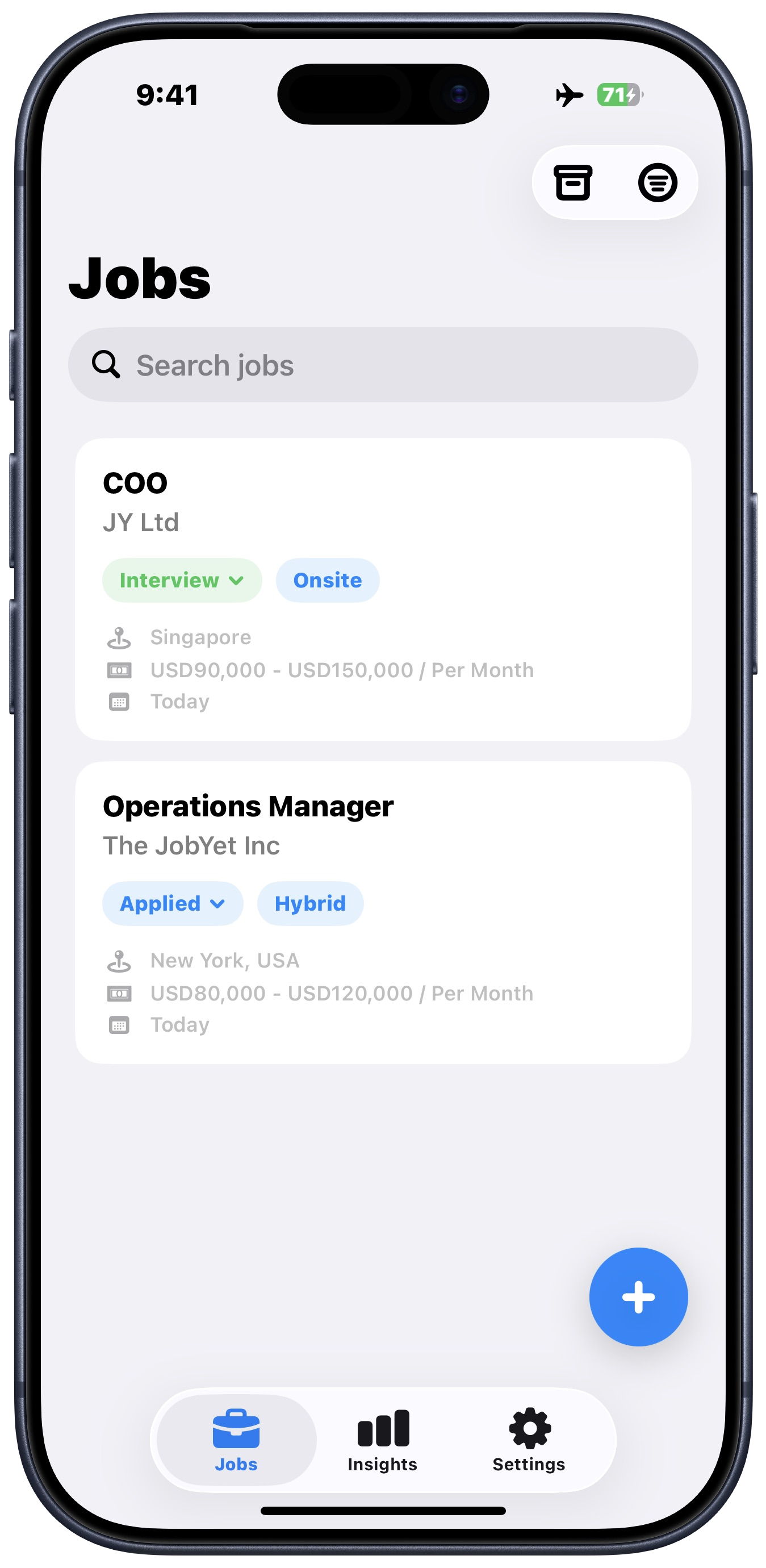
JobYet Jobs screen inside an iPhone showing saved application cards, statuses, search, and bottom navigation

The job search gets messy fast

求职信息很快就会变乱

Job posts should not live in five different places.

别再让求职信息散落在各个平台。

Screenshots, saved links, job boards, notes, and follow-ups pile up quickly. JobYet gives every opportunity a clear place.

截图、收藏链接、招聘平台、备忘和后续跟进很快混在一起。JobYet 给每个机会一个清晰的记录。

Save before it disappears

先把机会保存下来

Capture job posts from screenshots before listings change, close, or get buried.

在职位变更、关闭或被淹没前,用截图保存机会。

Know what happened next

记录每一步进展

Track Saved, Applied, Interview, Offer, Rejected, and Ghosted in one place.

用 Saved、Applied、Interview、Offer、Rejected 和 Ghosted 管理状态。

See the search clearly

看清整个求职进度

Understand where your applications stand without digging through notes and screenshots.

不用每次都翻备忘录或沟通记录,也能了解每个投递进度。

Smart Scan

From screenshot to saved job.

从截图到职位记录。

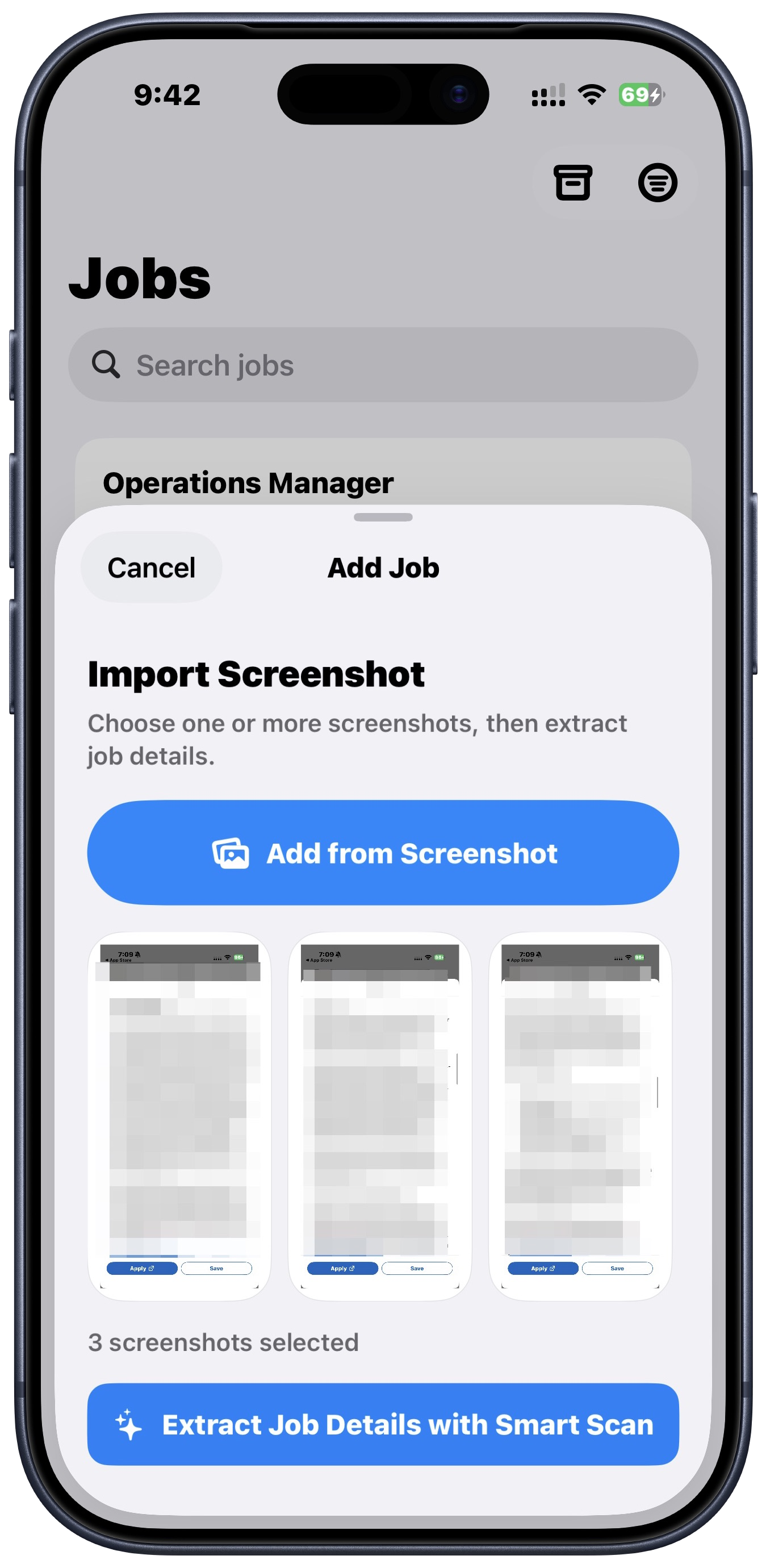
Pick job-posting screenshots, let on-device OCR read the text, then use Smart Scan to turn it into editable job details.

选择职位截图,先由设备本地 OCR 读取文字,再用 Smart Scan 整理成结构化信息。保存前,所有内容都由你确认。

01 Choose screenshots 选择截图
02 Review job details 检查职位详情
03 Save as a structured job 保存为职位记录
Local OCR first 先本地 OCR Smart Scan Smart Scan Review before saving 保存前检查

OCR and extraction can make mistakes. JobYet keeps the review step built in.
OCR 和提取有可能出错。JobYet 会让你在保存前进行检查。

JobYet Smart Scan import flow inside an iPhone showing screenshot selection and Smart Scan extraction

Application tracker

投递追踪

Every application has a status.

每一次投递都有状态。

Search jobs, filter by status, company, location, and archive, then keep the details you need inside each saved role.

随着求职进展变化,随时搜索、筛选、编辑和归档职位。

Saved Applied Interview Offer Rejected Ghosted

Operations Manager

The JobYet Inc

Applied Hybrid
  • New York, USA
  • USD80,000 - USD120,000 / year
  • Added today

Product Analyst

Northstar Labs

Saved Remote
  • Singapore
  • Source: Company Website
  • Ready to apply

Complete job records

完整职位记录

Keep title, company, location, salary, platform, URL, notes, requirements, contact, and raw OCR text together.

职位、公司、地点、薪资、平台、链接、备注、要求、联系人和 OCR 原文都能放在一起。

Flexible filtering

灵活筛选

Find roles by status, company, location, and archived state when your search gets busy.

求职变忙时,可以按状态、公司、地点和归档状态快速找到职位。

Interview rounds included

记录面试轮次

When a role moves forward, add interview rounds without moving to another app.

进入面试后,可以继续在同一个记录里添加和追踪面试轮次。

Insights

进展洞察

See your search, not just your screenshots.

看到求职进展,而不只是堆积截图。

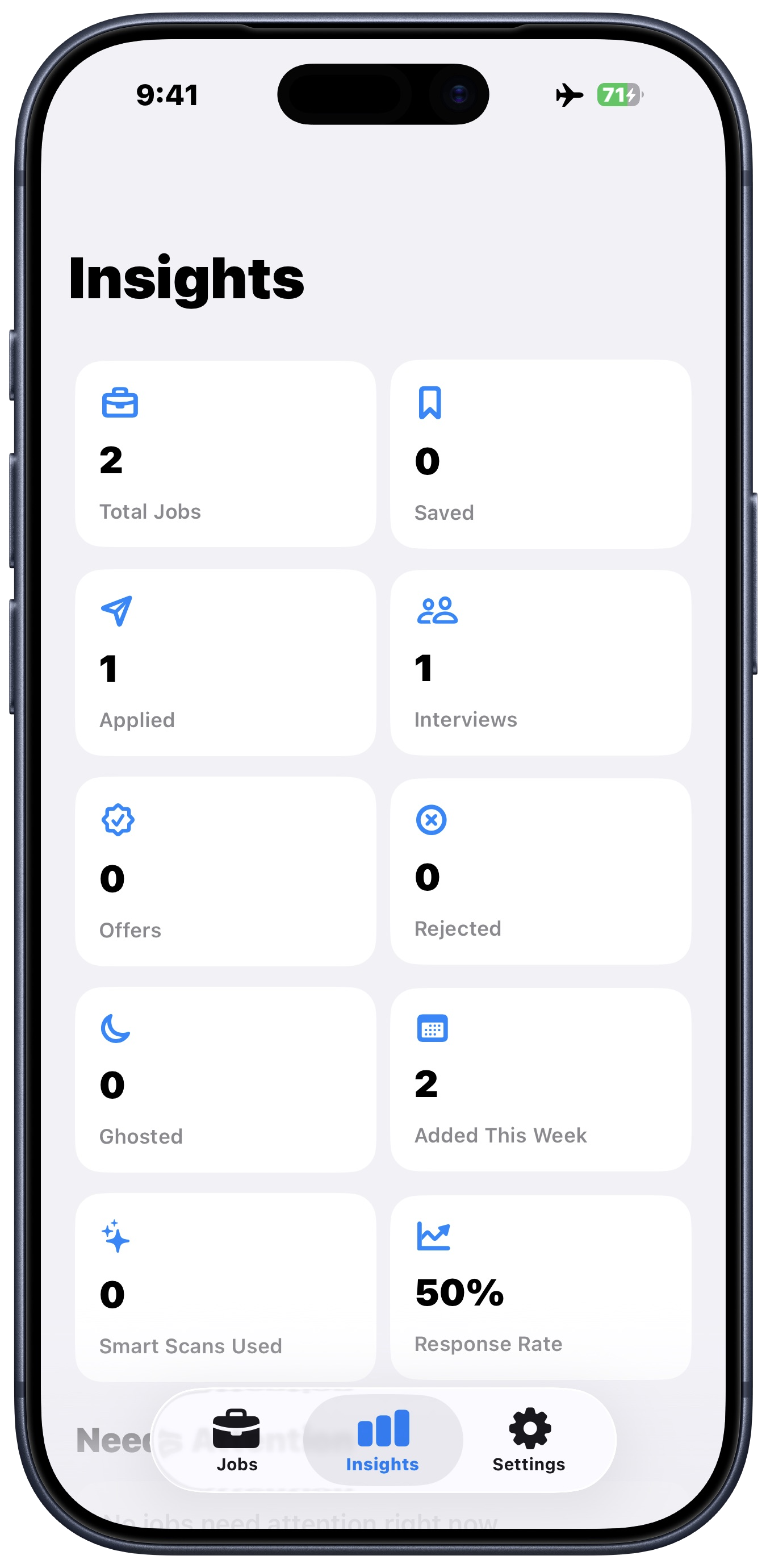
Understand how many jobs you saved, applied to, interviewed for, and archived - so your search feels less chaotic.
了解你保存了多少职位、投递了多少、进入了多少面试,以及哪些需要继续跟进。

42Total jobs
28Applied
6Interviews
3Need attention
9Archived
JobYet Insights screen inside an iPhone showing totals, application status counts, Smart Scans used, and response rate

Before the interview starts

面试开始前

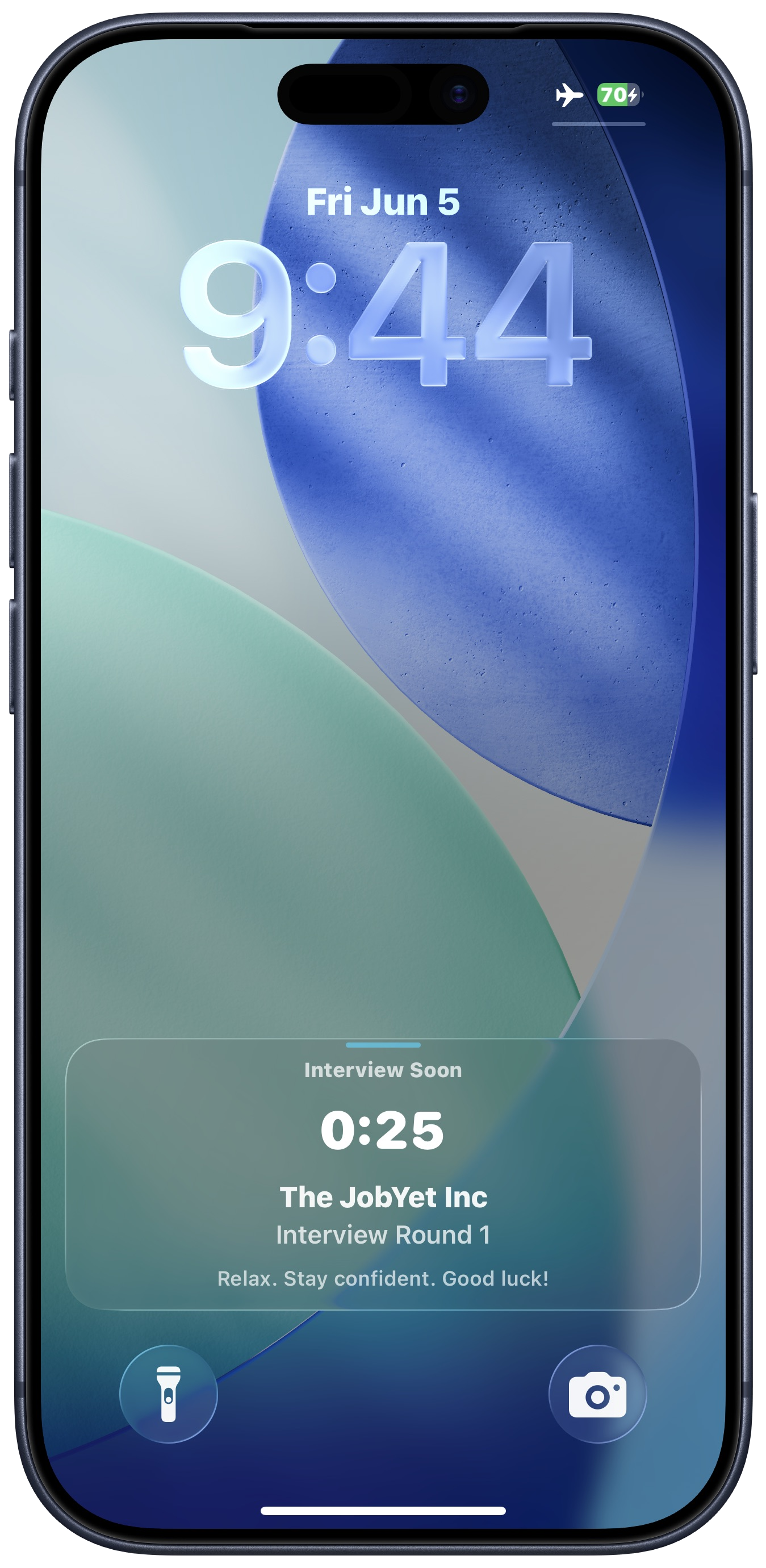
A Live Activity for the final stretch.

面试前半小时,用 Live Activity 提醒你。

JobYet can surface a countdown before an interview, so the next round stays visible while you get ready.
JobYet 可以在面试开始前显示倒计时,让你合理规划最后的准备时间。

JobYet Live Activity inside an iPhone showing an upcoming interview countdown before the interview starts

Privacy

隐私

Local-first where it matters.

重要数据,本地优先。

Your saved jobs stay on your device. Screenshots are used to create the job record, and Smart Scan processes recognized text for extraction.

已保存职位留在你的设备上。截图和提取文字仅用于创建职位记录。

Saved jobs stay on device

本地记录

Saved jobs are stored locally on device using SwiftData.

已保存职位使用 SwiftData 存储在本设备。

No account required

无需账号

No login and no cloud sync in the current version.

当前版本无需登录,也不会上传到服务器。

Screenshots create records

截图用于创建记录

Screenshots are used only to help create the job record you review.

截图不会上传到服务器。

Text-focused Smart Scan

文字提取

Smart Scan processes OCR text for extraction and does not permanently store uploaded images.

Smart Scan 使用本地 OCR 用于提取信息,不会保存上传信息。

Read the full Privacy Policy 阅读完整隐私政策

Plans

订阅方案

Start free. Upgrade when Smart Scan saves you time.

免费使用,需要更快保存时再升级。

Manual tracking stays simple. Smart Scan gives you faster job entry when you need it.

手动记录保持简单。需要更快录入职位时,Smart Scan 可以帮你节省时间。

Pro+ is designed for active searches. More screenshots, faster record, fewer half-saved opportunities.
Pro+ 适合海投和积极投递的你。 更多截图、更快保存,更少遗漏的机会。

Prices and plans may vary by region and are subject to change. The final price will be shown by the App Store before purchase.

价格和套餐详情可能因地区而异,最终价格以 App Store 显示为准。

Your next opportunity is one screenshot away.

下一个机会,就在下一个截图。

JobYet is coming soon to the App Store.

JobYet 即将登陆 App Store。